


Connecteam Team Management App
4.81.22K Reviews
App Specs
- Version
- 9.1.14
- Updated On
- License
- Free
- Downloads
- 1,000,000+
- Developer
- Connecteam Inc.
- Categories
- Business
- Platform
- Android, iOS
Screenshots
 Analysis by AppCompare
When a shift starts in a busy shop or a crew is spread across several job sites, small communication gaps can quickly turn into missed handoffs. That is the kind of everyday problem Connecteam is built to address: it brings practical team-management work into a mobile app rather than leaving every update, schedule, and task in separate places. I see its strongest appeal in businesses whose employees spend much of the day away from a desk.
Where a live connection matters
Connecteam brings together work that often depends on people seeing the same current information: a schedule, a message, a task, or a training item. That can make a connected phone especially useful at the start of a shift, when someone needs to check where they are expected, or when a manager needs to share a change with the team. The benefit is less about having another place to chat and more about reducing the number of separate channels staff must remember to check.
Because these workflows rely on timely updates, I would treat a dependable internet connection as part of the normal setup. Before rolling the app out, managers should decide how staff will handle a weak signal or a device that cannot connect at a job site. A phone app can make information easier to reach, but it is not a substitute for a clear backup process when a shift-critical update cannot get through.
Made for work away from a desk
The mobile format makes sense for retail workers, field crews, and other teams whose day does not revolve around a computer. Staff can use a phone to check work details and complete routine interactions, while managers can keep an eye on operations without staying at a desk. That is a more natural fit for a distributed workforce than asking everyone to rely on long email threads or a shared office computer.
A realistic example is a store manager preparing for a busy day. They can use the schedule to organize coverage, share an announcement about a change, and assign a checklist for opening duties. Employees arriving for their shifts have a common place to check what is expected, and the manager can follow the team’s progress instead of chasing several paper lists. The value comes from keeping related work in one routine, not from assuming the app will solve every staffing issue by itself.
What to do when the workflow is interrupted
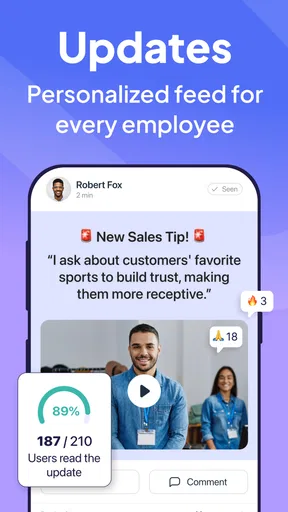
Connectivity is only one possible interruption. People may miss a notification, forget to check a schedule, or use a device that is not immediately available. Read receipts can help a manager see whether an announcement has been opened, but an opened message is not the same as a confirmed understanding. For instructions that affect safety, customer service, or a time-sensitive handoff, I would still use a direct confirmation process when needed.
It also helps to agree on what staff should do if an update does not appear when expected. A manager can set a routine for checking the latest schedule before a shift and identify a backup way to contact someone if a last-minute change is urgent. That small bit of planning matters because a centralized tool makes the normal workflow easier, but it can also make teams overly dependent on checking one place unless expectations are clear.
Worth Reading Before You Choose

EA SPORTS FC Mobile 26 Is a Bigger Football Game, but It Takes Time

Flipboard Shows What News Apps Must Do Beyond the Feed

Switching to Android Auto Means Rethinking Your Driving Routine

Google Calendar Makes a Crowded Week Easier to Manage

Ludo King Makes the Most of the Minutes Between Plans

Baby Panda World Brings Quick Play to Modern Phones, but Its Game Library Feels Busy
Keeping mobile use focused
A team app can reduce scattered communication, yet it can also add another source of notifications to an already busy phone. I would keep announcements purposeful and make clear which messages require a response. For everyday teams, separating urgent shift information from general conversation helps employees spot what they need without treating every alert as equally important.
Managers should also think about the practical side of shared work devices and personal phones. A rollout works better when people know which device they are expected to use, how to access work information, and whom to ask for help. Those decisions are not glamorous, but they shape whether a mobile tool becomes part of the workday or another app that staff forget to open.
Who will get the most from it
I would look closely at Connecteam if I managed a team with changing schedules, employees working in different locations, or recurring tasks that need a consistent process. It is especially appealing when staff need practical mobile access and managers want schedules, communication, task follow-up, and onboarding to sit within one management routine. A small business can benefit too, provided it has enough coordination needs to justify setting up a dedicated system.
It is less compelling for a solo worker, a small group that already coordinates easily in person, or an office team whose existing calendar and communication tools already cover the basics. If all you need is a simple group chat, a general messaging app may feel lighter. If your organization depends on a specialized system for a narrow operational process, that purpose-built product may be a better fit than asking a broad team app to replace it.
How it compares with familiar alternatives
Compared with a mix of group chat, spreadsheets, and paper checklists, Connecteam’s main advantage is that it can bring several recurring management jobs into one mobile setting. That can reduce duplicate entry and make it easier for a manager to connect a schedule with the work people need to complete. The trade-off is that teams must learn a shared workflow and keep the information maintained; consolidating tools does not automatically make outdated schedules or vague assignments clearer.
Compared with a desktop-first staff-management system, a phone-centered approach is more convenient for workers who are moving between customers, locations, or shifts. But a manager handling detailed planning may still prefer a larger screen for careful setup and review. I would think of mobile access as a practical extension of operations rather than assuming every management task is equally comfortable on a phone.
Small habits that make the setup work
One useful approach is to start with a single repeatable process, such as shift communication or an opening checklist, rather than moving every team procedure into the app at once. That lets staff learn where to look and gives managers a chance to spot confusing assignments before the system becomes central to more work. Once the routine feels clear, adding another workflow is easier to evaluate.
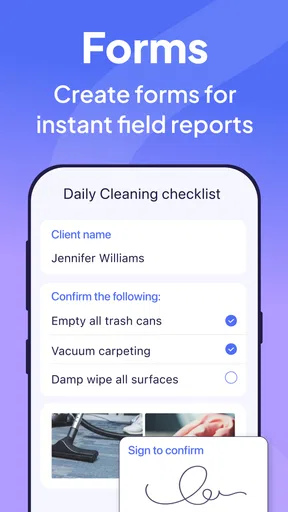
For checklists, I would keep each item concrete enough that a worker can tell when it is complete. A vague instruction such as “prepare the area” invites different interpretations, while a short, observable task is easier to complete and review. Likewise, training modules are most useful when they support a real onboarding need and do not simply reproduce a long document in a less convenient format.
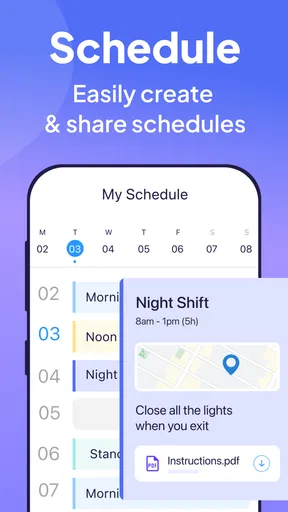
Scheduling deserves the same care. A manager should make sure staff know which version to follow and when to check for changes, especially around shift handovers. The app can help distribute schedules, but the team still needs a reliable habit for reviewing them. This is a practical distinction: software can make information available, while a workplace routine determines whether people actually act on it.
Getting a feel for the app
Connecteam is a business app developed by Connecteam Inc., and its focus is employee management rather than personal productivity. It is free to download and has an Everyone age rating. The app has an average rating of 4.8 from around 26,000 ratings, with about 1,200 written reviews and over one million installs, which suggests that many people have tried it. Those figures are useful context, but I would still judge it by whether its workflows match the way your own team works.
It first appeared on May 18, 2016, and version 9.1.10 requires Android 7.0 or later. If you are considering it for a team, check that your staff’s devices can run it and that people are comfortable using a phone for work tasks. The practical question is not just whether the app installs, but whether your team can access it reliably during the places and times when schedules or instructions matter.
Using Connecteam in the working day
I’ll focus on the everyday routines that make a team-management app useful: deciding where staff should look for current information, keeping instructions clear, and choosing a practical fallback when a phone or connection gets in the way. A good rollout should make those habits easier to follow, not leave employees guessing about what to check next.
Getting Started with Connecteam
Diving into Connecteam is a breeze. Right off the bat, the app welcomes you with a clean and intuitive interface that feels like a warm hug on a chilly day. No steep learning curve here, folks! You can easily set up your team, import contacts, and organize your operations without breaking a sweat.
Features that Stand Out
Now, let’s talk features, because Connecteam has quite a few up its sleeve. First up, the scheduling feature. It’s like having a personal assistant who never sleeps. You can create schedules, send them out, and even get notified when someone opens the schedule. Goodbye, no-shows!
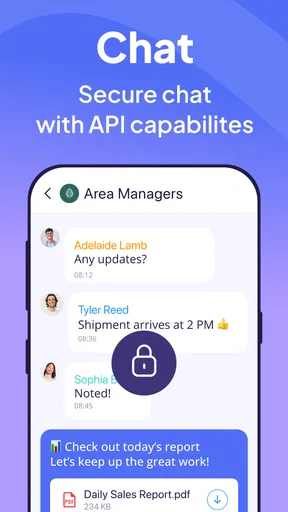
Communication is key, and this app nails it with its chat feature. Whether you need to broadcast an important announcement or just share a meme to lighten the mood, the chat functionality keeps everything flowing smoothly. Plus, there’s a nifty feature for read receipts, so you know who’s in the loop and who might need a nudge.
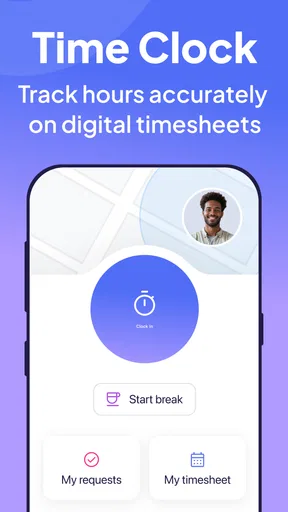
Time tracking is another big win here. Employees can clock in and out with just a tap, and GPS tracking ensures everyone is where they need to be. No more guesswork or manual time sheets. This feature alone can save tons of time and hassle.
Training and Onboarding Made Easy
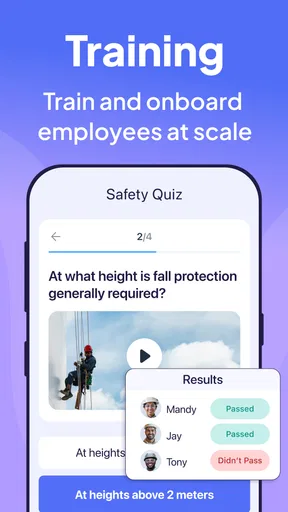
For businesses that are constantly onboarding new team members, Connecteam’s training features are a godsend. You can create training modules and quizzes that new hires can complete at their own pace. It’s a fantastic way to ensure everyone is up to speed without having to schedule endless training sessions.
Managing Tasks and Checklists
Keeping track of daily tasks can often feel like herding cats, but not with Connecteam. The task management feature lets you create checklists and assign tasks with deadlines. Employees can tick off completed tasks, giving managers a clear overview of progress. It’s like having a digital to-do list that everyone can see.
The Mobile Experience
In today’s world, being able to manage things on the go is crucial. Connecteam’s mobile app doesn’t disappoint. It’s sleek, fast, and mirrors the desktop experience seamlessly. Whether you’re at a coffee shop or in a cab, managing your team is literally at your fingertips.
Pricing and Plans
Now, let’s talk money. Connecteam offers a free plan, which is great for small teams just getting started. As your team grows, there are several affordable subscription options that unlock additional features. It’s a flexible system that allows you to scale without breaking the bank.
Final Thoughts
All in all, Connecteam is more than just an app; it’s a comprehensive team management solution that can transform the way you handle daily operations. From scheduling to communication, and training to task management, it checks all the boxes. Sure, no app is perfect, but Connecteam comes pretty darn close. If you’re looking to streamline your management processes and bring some sanity back into your work life, this app should be at the top of your list.
Ready to give it a whirl? You can download Connecteam from the App Store or Google Play and start transforming your team management today.
Pros
- User-friendly interface simplifies navigation.
- Comprehensive task management features.
- Customizable workflows for diverse needs.
- Real-time communication improves teamwork.
- Integrates well with other productivity tools.
Cons
- Limited offline functionality.
- May overwhelm new users initially.
- Premium features require subscription.
- Occasional syncing delays reported.
- Mobile app lacks some desktop features.
FAQs for Connecteam Team Management App
What is Connecteam and who is it for?
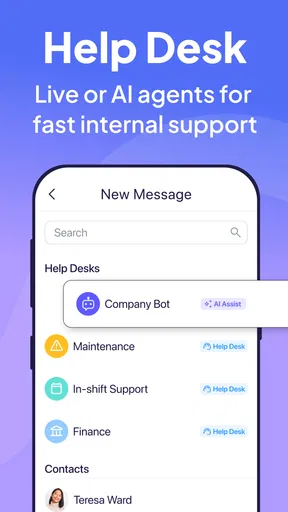
Connecteam is a comprehensive team management app designed for businesses of all sizes. It facilitates communication, task management, scheduling, and training among team members. Ideal for managers and team leaders, it helps streamline operations and improve productivity across various industries, from retail and hospitality to logistics and healthcare.
How does Connecteam enhance communication within a team?
Connecteam enhances team communication by providing a centralized platform where members can chat, share updates, and access company news. It supports direct messaging and group chats, ensuring everyone stays informed and connected. The app also integrates features like push notifications to alert employees about important announcements.
What features does Connecteam offer for task management?
Connecteam offers robust task management features, including task assignment, progress tracking, and deadline reminders. Managers can create tasks, assign them to specific employees, and track their completion status in real-time. This ensures accountability and helps teams stay organized and on schedule.
Is Connecteam user-friendly for employees who are not tech-savvy?
Yes, Connecteam is designed with a user-friendly interface that caters to all levels of tech proficiency. Its intuitive design allows even those who are not tech-savvy to navigate the app easily. The straightforward layout and clear instructions make it simple for employees to access the features they need without confusion.
What are the pricing options for Connecteam?
Connecteam offers a variety of pricing plans to suit different business needs. There is a free plan with basic features and several paid plans that include advanced options like custom workflows and analytics. Businesses can choose a plan based on the size of their team and the specific functionalities they require.


